

基于Staticman的评论功能
概述H1
使用Staticman的大致工作流程是:
- 客户端向Staticman的实例发送HTTP请求,创建表单内容(即一系列字段)
- Staticman接收到请求后,根据当前的URL(URL中的参数对应仓库信息),读取对应仓库下的staticman配置文件
- Staticman读取配置文件中的规则,以文件的形式创建对应表单的内容(即包含一系列字段的文件)
- Staticman创建一个包含所创建的文件的PR请求
- 手动或者自动合并请求,将包含表单内容的数据文件导入到仓库目录内
- 重新构建系统
- 系统读取静态文件内容并展示
部署和配置H1
Github协作H2
Staticman可以通过配置 GitHub application、GitHub personal access token 来创建PR,其中GitHub personal access token 可以用自身账号的,也可以协作者账号,只要有仓库的内容权限和PR权限即可。
下面以GitHub application为例
创建GitHub applicationH3
Github头像 → Setting → Developer settings → new Github App
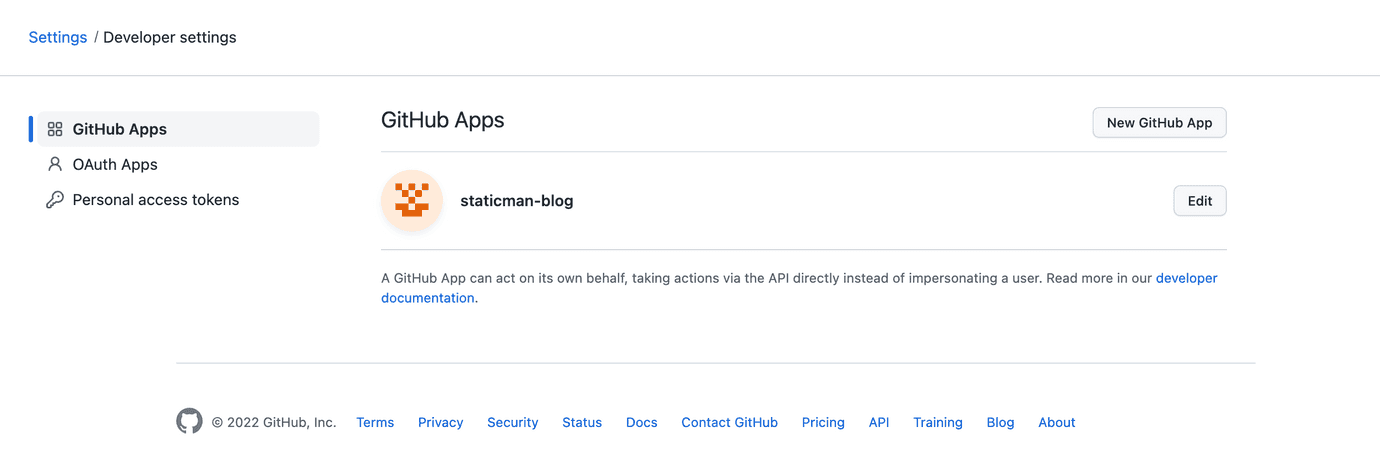
需要配置Webhook URL(这个时候还没创建staticman可以先不填),并赋予下面的权限
- Contents:
Read & Write- 用于读取 Staticman 配置文件 - Pull Requests:
Read & Write- 用于创建、合并PR - 订阅
Pull request事件
保存下创建完的GitHub application的App ID、private key
安装Github applicationH3
Github头像 → Setting → Integration → Applications
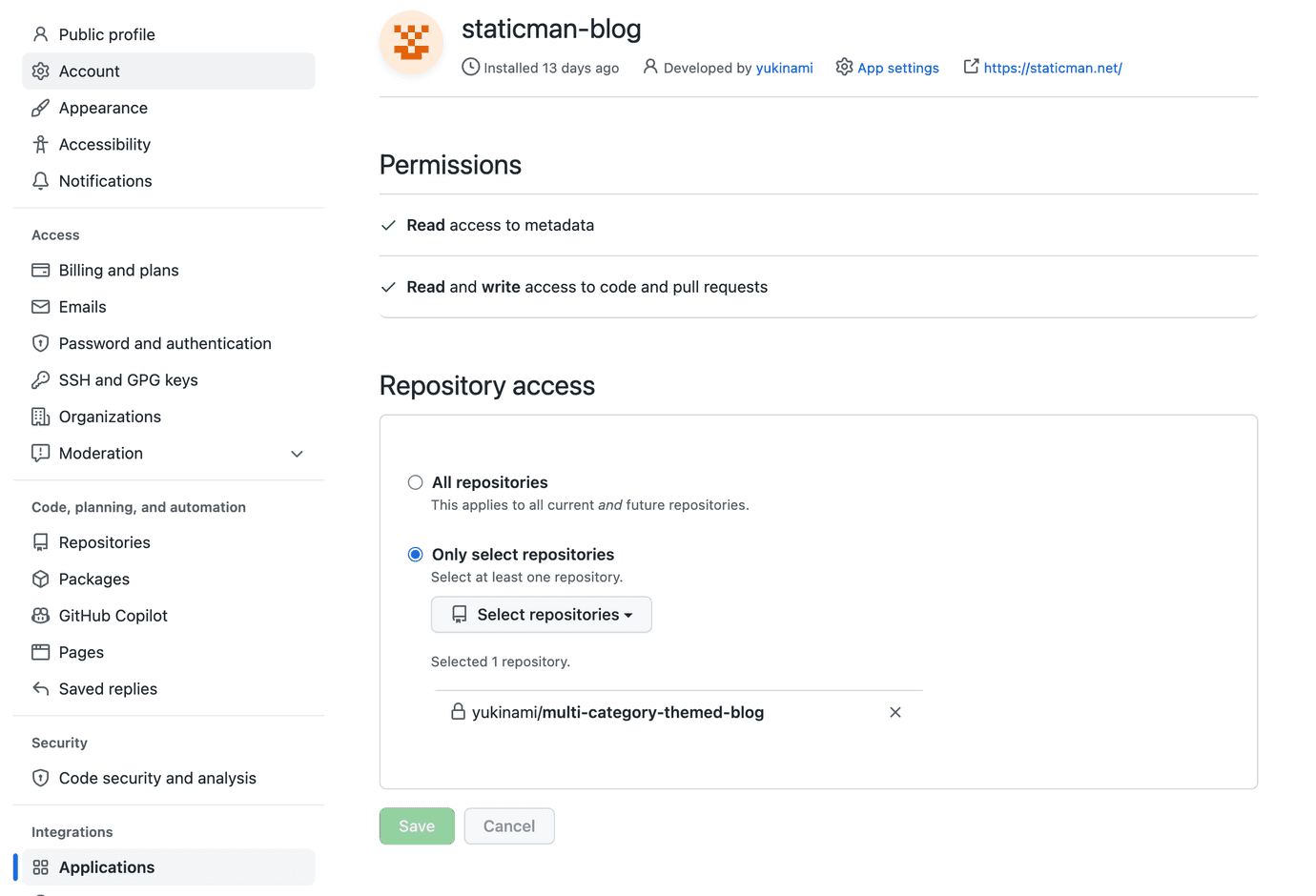
部署StaticmanH2
可以使用链接来一键部署到heroku,创建完staticman应用后,把应用地址填入之前创建的Github application的Webhook URL配置。
Heroku的应用中, Settings → Config Vars → Reveal Config Vars 配置环境变量来配置staticman的参数
GITHUB_APP_ID、GITHUB_PRIVATE_KEY、RSA_PRIVATE_KEY。前天两个是对应之前创建的Github application的,RSA_PRIVATE_KEY填入自己本地通过openssl genrsa创建生成key。NOET: 💡
RSA_PRIVATE_KEY用于加解密站点配置的配置项。因为站点配置文件可能是公共可访问的,其中包含一些敏感信息。可以通过https://{STATICMAN_BASE_URL}/v3/encrypt/xxx来加密xxx,把返回的结果填入配置文件。Staticman会在读取时解密。
站点配置H2
站点根目录下创建staticman.yml,内容可以复制staitcman仓库中的staticman.sample.yml
tsx
# Name of the property. You can have multiple properties with completely# different config blocks for different sections of your site.# For example, you can have one property to handle comment submission and# another one to handle posts.comments:# (*) REQUIRED## Names of the fields the form is allowed to submit. If a field that is# not here is part of the request, an error will be thrown.allowedFields: ["message", "name", "email", "postId", "replyTo", "replyToUser"]# (*) REQUIRED## Name of the branch being used. Must match the one sent in the URL of the# request.branch: "publish"# Text to use as the commit message or pull request title. Accepts placeholders.commitMessage: "Comment from {fields.name} on {options.slug}"# (*) REQUIRED## Destination path (filename) for the data files. Accepts placeholders.filename: "entry{@timestamp}"# The format of the generated data files. Accepted values are "json", "yaml"# or "frontmatter"format: "json"# List of fields to be populated automatically by Staticman and included in# the data file. Keys are the name of the field. The value can be an object# with a `type` property, which configures the generated field, or any value# to be used directly (e.g. a string, number or array)generatedFields:date:type: dateoptions:format: "timestamp"# Whether entries need to be appproved before they are published to the main# branch. If set to `true`, a pull request will be created for your approval.# Otherwise, entries will be published to the main branch automatically.moderation: true# Name of the site. Used in notification emails.name: "Joen's Blog"# Notification settings. When enabled, users can choose to receive notifications# via email when someone adds a reply or a new comment. This requires an account# with Mailgun, which you can get for free at http://mailgun.com.#notifications:# Enable notifications#enabled: true# (!) ENCRYPTED## Mailgun API key#apiKey: "1q2w3e4r"# (!) ENCRYPTED## Mailgun domain (encrypted)#domain: "4r3e2w1q"# (*) REQUIRED## Destination path (directory) for the data files. Accepts placeholders.path: "content/data/comments/{options.slug}"# Names of required fields. If any of these isn't in the request or is empty,# an error will be thrown.requiredFields: ["name", "message", "postId"]# List of transformations to apply to any of the fields supplied. Keys are# the name of the field and values are possible transformation types.transforms:email: md5
根配置comments 为配置的名称
- allowedFields 允许提交的字段
- commitMessage PR的提交信息
- branch 基于哪个分支创建PR
- format 文件格式
- generatedFields 自动生成的字段以及格式,这里配置了自动生成timestamp的date字段用于标识创建时间(timestamp是以毫秒为单位的unix时间戳,timestamp-seconds以秒为单位的unix时间戳)
- moderation 是否需要手动合并
- path 文件的创建路径,这里用到了options中的slug变量作为动态值,以slug为目录名创建文件
- transforms 字段的转换规则,这里对email进行md5哈希,用于显示gravatar头像
应用集成H1
下面以Gatsby集成评论系统为例,目标是在content/data/comments/{options.slug} 目录下创建以slug的目录为单位保存评论,方面管理
评论SchemeH2
tsx
exports.createSchemaCustomization = ({ actions, schema }) => {const { createTypes } = actionscreateTypes(`type CommentsJson implements Node {_id: String!postId: String!message: String!name: String!email: Stringdate: Float!replyTo: StringreplyToUser: String}`)}
其中
- postId 用于标识评论属于哪篇文章,由于我使用的gatsby-blog-theme-core在创建blog的page页面时只传入了post的id,所以只能使用postId来区分评论所属的文章。
- replyTo 用于标识子评论
读取评论的Json文件H2
gatsby-transformer-json默认支持
- 单个json文件中包含多个json对象,以json文件名作为对象类型
- 单个json文件中包含单个json对象,以所在目录名作为对象例诶行
Staticman的情况,我们要使用后者,但是我们又不能直接拿目录名作为对象名,因为我们评论的父目录应该是slug,再上一层的目录名才应该是对象名,因此我们需要做些配置
tsx
{resolve: 'gatsby-transformer-json',options: {typeName: ({ node, object, isArray }) => {if (node.internal.type !== `File`) {return _.upperFirst(_.camelCase(`${node.internal.type} Json`))} else if (isArray) {return _.upperFirst(_.camelCase(`${node.name} Json`))} else if (object.message){// meaing object is comment object and should take parent path name as typereturn _.upperFirst(_.camelCase(`${path.basename(path.resolve(node.dir, '../'))} Json`))} else {return _.upperFirst(_.camelCase(`${path.basename(node.dir)} Json`))}}}},
这里我们判断node对象是否包含message字段,如果包含则当作评论对象来处理,则以父目录的父目录名作为对象类型
查询评论H2
查询评论主要是需要嵌套查询子评论,Graphql中无法进行无限的嵌套查询,只能通过手动多设置几个嵌套层次
tsx
graphql`fragment CommentsJsonFields on CommentsJson{_idmessagenamedatereplyToUser}query PostPage($id: String!) {allCommentsJson(filter: {postId: {eq: $id}, replyTo: {eq: null}}) {nodes {...CommentsJsonFieldscomments {...CommentsJsonFieldscomments {...CommentsJsonFields}}}}}`;
这里我们进行了3次嵌套查询,同时也意味着,我们创建评论的对象的嵌套层次不能超过3层。
创建评论H2
评论字段应该以fields[xxx] 的key形式,以application/x-www-form-urlencoded 的encoding 的POST方式提交到staticman,提交地址为
{STATICMAN_BASE_URL}/v3/entry/{GIT_PROVIDER}/{GIT_PROVIDER_USERNAME}/{REPO}/{BRANCH}/{property (optional)} ,其中property为配置文件的中的根级别的key,例如
tsx
const response = await fetch('https://staticman-snowblink-blog.herokuapp.com/v3/entry/github/yukinami/multi-category-themed-blog/publish/comments',{method: 'POST',headers: { 'Content-Type': 'application/x-www-form-urlencoded' },mode: 'cors',body: Object.keys(values).map(key => key + '=' + encodeURIComponent(values[key])).join('&'),},
嵌套评论H3
由于Graphql的查询深度的限制,我们在创建评论的时候也需要避免创建深度超过3层的子评论。
我采用的解决办法是,当嵌套深度超过3层时,将replyTo 设置为要评论的对象的父评论的ID,同是添加replyToUser 字段来标识回复的目标对象。
Gravatar头像显示H3
Gravatar头像用Urlhttps://www.gravatar.com/avatar/${emailhash} 可以获取到,emailhash 标识对email地址进行hd5获取哈希值,由于staticman的transforms 配置中支持md5转换,直接把email字段拿出来显示即可。
使用H1
调用Staticman进行评论后,会产生类似如下的PR。
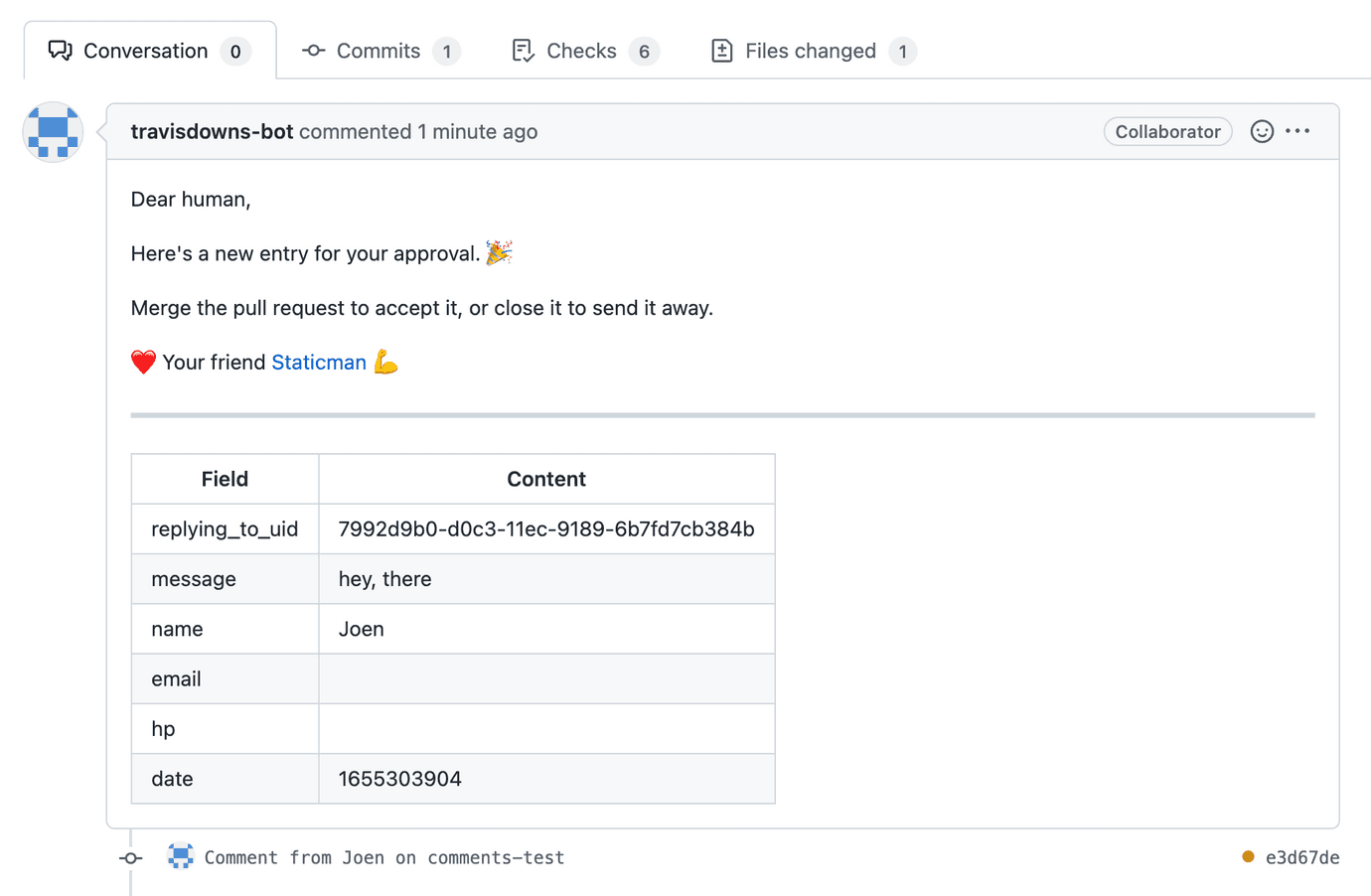
我们只需接受PR,然后由Vercel进行构建发布新的版本即可看到评论内容。
评论
新的评论
上一篇
Gradle Platform
定义BOM Platform可以定义生成BOM文件 启用插件 定义约束,可以包括外部的依赖和项目的内部依赖 参考: https://docs.gradle.org/current/userguide/platforms.html api 以及 implementation im…
下一篇
Unified
Unified生态专门处理不同格式内容的转换与处理,主要流程是 通过Parser将源文件的内容转换的AST 不同的AST之间进行转换 对AST进行修改 将AST进行Stringify转换成目标格式的内容 AST esast — JavaScript hast — HTML …