

Consul Service Mesh 集成apisix
要让apisix和Consul Service Mesh集成工作的核心是需要将apisix的Pod接入Consul。 我们是在k8s环境下使用Consul Service Mesh,对应的apisix也是使用chart安装的。所以下面主要是针对apisix的Chart进行的配置。
注入SidecarH2
首先需要将consul.hashicorp.com/connect-inject注解添加到apisix server对应的Pod的上
bash
podAnnotations:consul.hashicorp.com/connect-inject: "true"
绑定ServiceH2
apisix默认会把service-gateway和apisix-admin两个service都绑定到apisix的Pod上,这样对于consul是不行的,consul要求只能有一个Consul services绑定到Pod上,可以使用consul.hashicorp.com/service-ignore: "true"来忽略apisix-admin对应的service
there are multiple Consul services registered for this pod when there must only be one. Check if there are multiple Kubernetes services selecting this pod and add the label
consul.hashicorp.com/service-ignore: "true"to all services except the one used by Consul for handling requests.
但是apisix chart中的label配置apisix.labels是会被加到所有的service上的,无法给某个service单独设置label,不过可以通过consul.hashicorp.com/kubernetes-service注解直接声明用于Consul服务注册的service
bash
podAnnotations:consul.hashicorp.com/kubernetes-service: 'apisix-gateway'
ServiceAccountH2
注册到consul的负载的Pod的对应的使用的serviceAccount的名称必须和Pod所绑定的Service名称一致
If ACLs are enabled, the serviceAccountName must match the Consul service name.
需要配置apisix的chart的对应的属性,apisix创建的serivce的名称是后helm release-name相关的(name: {{ include “apisix.fullname” . }}-gateway),这里我安装的release-name为apisix,所以对应的name为apisix-gateway
bash
serviceAccount:create: truename: apisix-gateway
其他配置H2
Transparent proxyH3
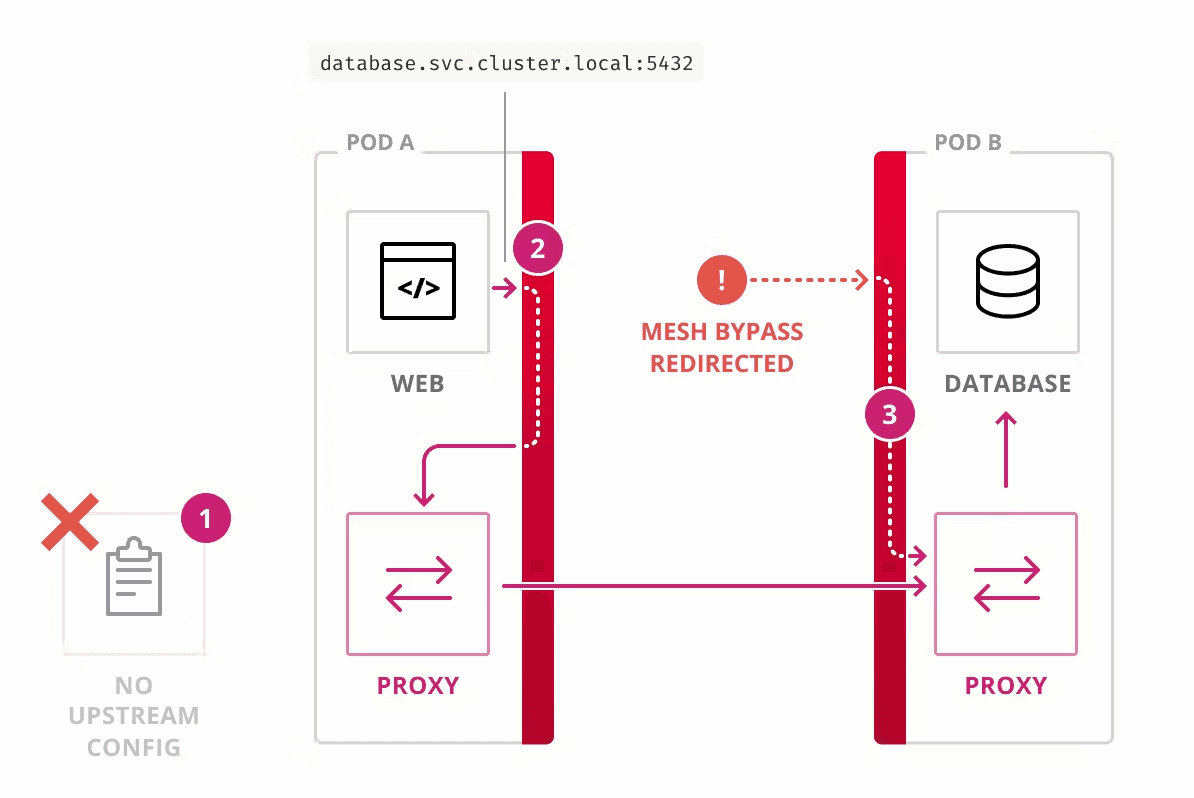 首先service mesh代理在透明模式时,Consul service mesh使用IPtables将inbound和outbound流量导向sidecar,再由sidecar来实现路由。因此在请求其他服务时会需要outbound port,接受请求时是使用的inbound port。
exclude inbound outboundH3
对Pod的请求透明代理模式下会被重定向到Proxy,可以配置consul.hashicorp.com/transparent-proxy-exclude-inbound-ports来跳过对一些端口的重定向
同样,Pod对外的请求也可以通过配置consul.hashicorp.com/transparent-proxy-exclude-outbound-cidrs来跳过一些网络范围的重定向。
dialedDirectlyH3
如果Ingress controller是作为负载均衡,直接路由请求到Pod IP而不是ClusterIP的,需要dialedDirectly: true,该参数允许处于透明模式的代理可以直接请求代理实例的IP地址
apisixH2
apisix要启用kubernetes的服务发现,来路由请求到k8s的service
bash
apisix:dns:resolvers:- 10.43.0.10nginx:envs:- KUBERNETES_SERVICE_HOST- KUBERNETES_SERVICE_PORT#logs:# errorLogLevel: "debug"discovery:enabled: trueregistry:kubernetes: {}
这里除了配置了服务发现,还配置了core-dns的地址。因为服务接入consul service mesh后会注入一个127.0.0.1 的nameserver,apisix使用的lua-resty-dns-client在进行dns查询时第一个nameserver查询失败就直接报错而不会继续查询下一个nameserver。导致apisix注入sidecar后,无法连上etcd,导致apisix报错。所以最终只能手动指定apisix的nameserver。
界面上配置目标service的格式为namespace/sevicename:port,这里的port需要注意的是要配置port name,而不是端口号。
评论
新的评论
上一篇
RKE2 ServiceLB
RKE2默认没有开启ServiceLB,因此Nginx Ingress也没有创建LoadBalance Service,而是使用的Hostport + Daemonset的方式。 开启ServiceLB 参数 --enable-servicelb 在官方文档中没有提及 Conf…